Your website isn’t working the way you want it to.
Maybe it looks outdated. Maybe something broke after an update. Maybe the mobile version is a complete mess, or you’re just tired of sending potential customers to a website you’re not particularly proud of.
When it comes to website repair vs. redesign, knowing which option makes the most sense can save you time, money, and a whole lot of frustration.
Whatever the problem, you’re probably wondering the same thing:
Do I need to fix my existing website, or is it time to start over?
And that’s a fair question.
A complete website redesign can be a significant investment, especially for a small business. But continuing to patch together a website with serious underlying problems can become expensive and frustrating, too.
The good news? You might not need to rebuild anything.
Sometimes a few targeted website repairs can make a big difference. Other times, a redesign is the smarter long-term investment.
Let’s look at how to tell the difference, what each option involves, and how to decide what actually makes sense for your business.
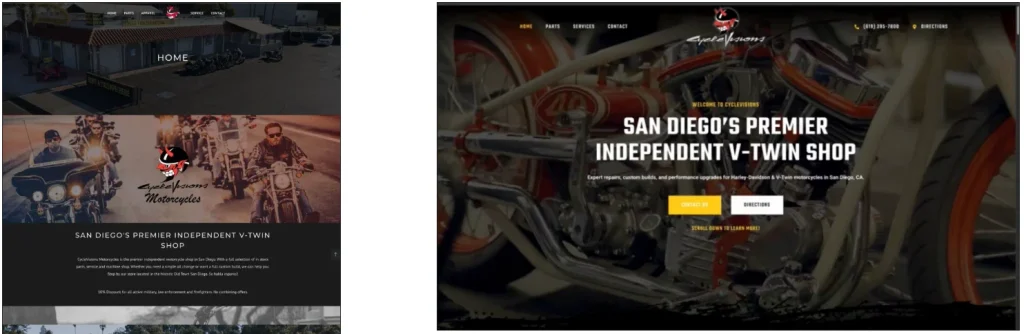
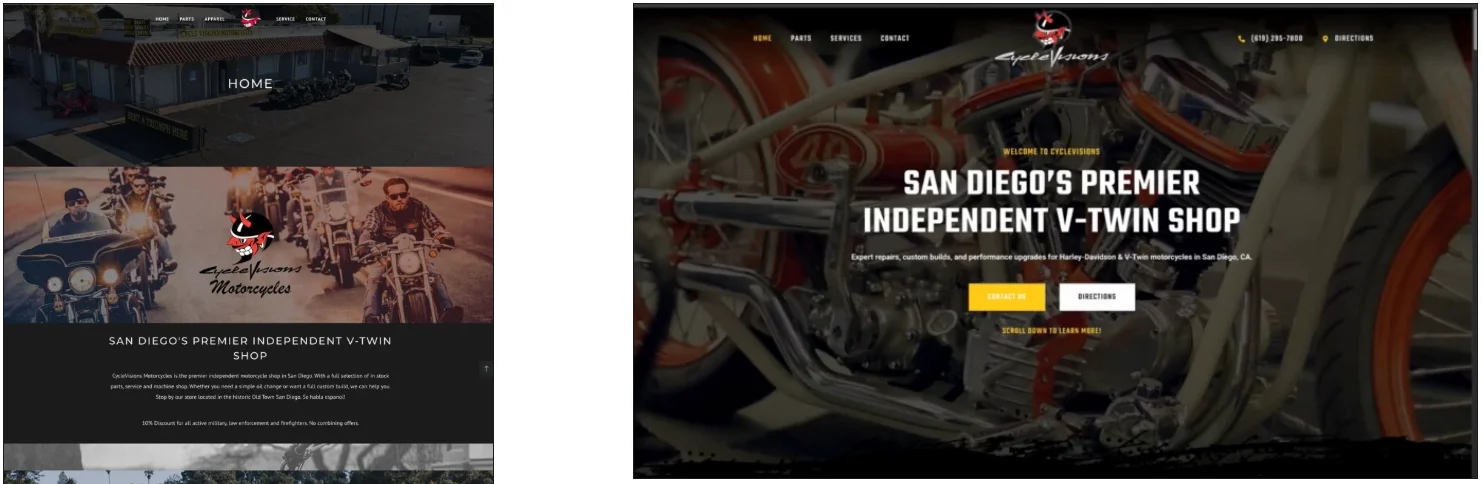
Real website repair vs. redesign: See how we transformed the website for CycleVisions Motorcycles in San Diego with an updated design, improved layout, and cleaner navigation.
What’s The Difference Between Website Repair Vs. Redesign?
Before deciding which direction to take, it helps to understand what you’re actually comparing.
Website Repair: Fix What’s Already There
Website repair focuses on identifying and correcting problems with your existing website.
Rather than replacing the entire design or rebuilding every page, the goal is to get things working properly again.
Common website repairs include:
- Fixing broken contact forms, buttons, or links.
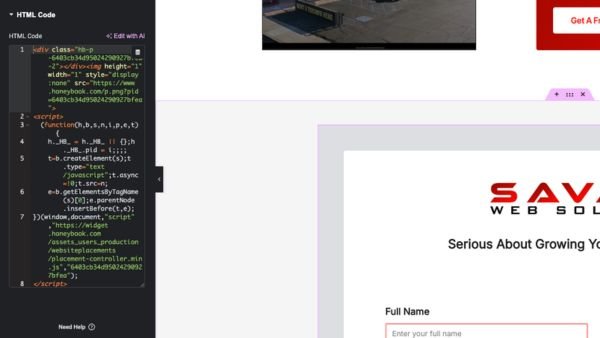
- Correcting WordPress or Elementor errors.
- Repairing mobile layout and spacing problems.
- Troubleshooting plugin conflicts.
- Improving slow-loading pages.
- Fixing navigation or display issues.
- Correcting broken website functionality.
In many cases, the website’s existing design, content, and structure can remain largely unchanged.
For example, if your website looks great but your contact form suddenly stops sending submissions, there’s probably no reason to rebuild the entire thing.
You need someone to investigate the form and fix the problem.
That’s a website repair.
Website Redesign: Rethink The Bigger Picture
A website redesign involves making more substantial changes to how your website looks, functions, or is organized.
That might include updating the visual design, restructuring pages, improving navigation, reorganizing content, or rebuilding parts of the website.
A redesign becomes worth considering when the problems go beyond a few broken elements.
Maybe your business has grown significantly since the website was built.
Maybe you offer 15 services, but they’re all crammed onto one page.
Or perhaps your website technically works, but the design is confusing, the content is outdated, and customers have a hard time figuring out what you actually do.
In those situations, fixing a few buttons probably won’t solve the bigger problem.
The simplest way to think about website repair vs. redesign is this: Website repair fixes what’s wrong. Website redesign improves or replaces what no longer works for your business.
And sometimes the right solution is somewhere in between.
6 Signs Your Website Probably Needs Repairs, Not A Redesign
Let’s start with the good news.
There are plenty of situations where you can improve your existing website without replacing it.
1. Your Website Looks Good, But Something Isn’t Working
Maybe your contact form stopped working.
Maybe a button leads to the wrong page, or an important feature isn’t behaving the way it should.
If you’re otherwise happy with the website, there’s no reason to assume the entire thing needs to go.
Start by identifying the specific issue.
A broken form may be caused by a configuration problem, a plugin conflict, an email delivery issue, or something else entirely.
Fixing that problem is generally a much smaller project than rebuilding the website.
2. Your Website Looks Broken On Mobile
This is a common issue, especially with WordPress websites built using visual page builders like Elementor.
Everything looks fantastic on a desktop monitor.
Then you open the website on your phone and suddenly the headings are enormous, images overlap, buttons are in strange places, and half the content doesn’t fit on the screen.
It’s frustrating, but it doesn’t automatically mean the website needs to be redesigned.
Many responsive layout problems can be corrected by adjusting the existing design.
Of course, if the entire website was built without considering smaller screens, the work may be more extensive.
But it’s still worth investigating before starting over.
3. A WordPress Update Caused Problems
WordPress websites rely on software that changes over time.
Plugins receive updates. Themes change. Page builders introduce new features and occasionally change how existing features behave.
Sometimes those updates cause unexpected problems.
You might notice missing styling, broken layouts, error messages, or features that suddenly stop working.
These situations typically call for troubleshooting first.
The important thing is understanding what changed and identifying the actual cause rather than randomly disabling plugins and hoping the problem disappears.
A software compatibility problem isn’t automatically a reason to buy an entirely new website.
4. Your Website Is Running Slowly
Nobody enjoys waiting for a website to load.
And if potential customers are using their phones to look up your services, a frustratingly slow website can make their experience even worse.
But slow performance doesn’t necessarily mean the website design needs replacing.
Possible causes include oversized images, excessive scripts, plugin issues, hosting limitations, and inefficient page construction.
Some performance problems can be improved without significantly changing the website’s appearance.
Others may require more substantial development work.
Before committing to a redesign, it’s worth finding out what’s actually causing the slowdown.
5. Your Website Just Needs Some Cleanup
Maybe your headings are inconsistent.
Some sections have strange spacing.
A few images need replacing.
Your service descriptions could use improvement, and the contact information needs updating.
None of that necessarily requires a new website.
Sometimes an existing website simply needs someone to go through it, correct the issues, and clean things up.
If the overall structure still makes sense, improving what you already have may be the most practical option.
6. You’re Happy With The Design And Structure
This might be the simplest consideration of all.
If you like how your website looks, customers can navigate it easily, and the overall structure fits your business, why replace it just because something needs attention?
Websites don’t have expiration dates.
An older website isn’t automatically a bad website.
If the foundation is still solid, repairing and improving the existing website may make much more sense than rebuilding it.
Need Help With Your Existing Website?
If your website has broken features, layout problems, WordPress errors, or other technical issues, you may not need to start over.
Explore Our Website Repair Services →
6 Signs It Might Be Time For A Website Redesign
Now let’s look at the other side.
There are situations where continuing to repair an existing website isn’t the best use of your time or money.
1. Your Website No Longer Represents Your Business
Businesses change.
Maybe you started with one service and now offer a dozen.
Maybe your company has grown, you’ve updated your branding, or you’re targeting a completely different type of customer.
But your website still looks like it did when you first opened.
That’s a legitimate reason to consider a redesign.
Your website should accurately communicate who you are, what you offer, and why customers should consider working with you.
If the website no longer reflects the business you’ve built, a larger update may be appropriate.
2. Customers Have Trouble Finding Information
Imagine landing on a contractor’s website because you need a particular service.
You click through a few pages, but it’s not clear whether the company actually offers what you’re looking for.
Their services are buried in paragraphs, the navigation is confusing, and there’s no obvious way to request a quote.
That’s more than a visual problem.
It’s a website structure problem.
A redesign can provide an opportunity to reorganize services, improve navigation, and make important information easier to find.
And sometimes that improvement is more valuable than changing the colors or adding fancy animations.
3. Your Website Was Built Without A Clear Plan
Not every website starts with a thoughtful strategy.
Sometimes a business owner needs something online quickly, chooses a template, fills in a few sections, and launches it.
There’s nothing inherently wrong with that.
For a brand-new business, getting accurate information online can be a perfectly reasonable first step.
But as the business grows, that original structure may become limiting.
Maybe you need separate pages for different services, additional content, more sophisticated navigation, or new features.
At some point, modifying the original setup may be less practical than planning a better structure.
4. Almost Every Page Needs Significant Work
Here’s a situation where I would seriously consider a redesign.
You start by identifying one problem.
Then you find another.
And another.
Suddenly, you’re looking at changes to nearly every page.
The homepage needs reorganizing. The services need rewriting. The mobile layouts are inconsistent. The navigation needs replacing, and the underlying page structure makes changes unnecessarily difficult.
Can all of those things be repaired individually?
Possibly.
But should they be?
That’s where comparing the total cost and long-term value becomes important.
If nearly every section needs substantial work, a redesign may be the more sensible investment.
5. Your Website Is Difficult To Manage
Your website shouldn’t require a complicated workaround every time you want to change a photo or update some text.
If making basic changes regularly causes unexpected problems, the website may have structural or implementation issues worth investigating.
Sometimes those issues can be corrected.
Other times, especially when a site relies on outdated or unsupported components, rebuilding portions of it may provide a more manageable long-term solution.
The goal shouldn’t be to replace technology simply because something newer exists.
It should be to create a website that works for your business and can be reasonably maintained.
6. Your Website Doesn’t Give Visitors A Clear Next Step
Here’s one that gets overlooked.
A website can look beautiful and still do a terrible job of helping visitors become customers.
Maybe there’s no clear call to action.
Maybe someone has to dig through several pages to find a phone number.
Maybe the contact form asks for too much information, or the service descriptions never explain why someone should choose your business.
These problems don’t always require a redesign.
Sometimes changing the content, improving calls to action, or reorganizing a few sections is enough.
But if those issues exist throughout the entire website, a broader redesign may be worth considering.
A good-looking website and an effective business website aren’t necessarily the same thing.
Website Repair vs. Redesign: A Quick Comparison
Still not sure which direction makes sense?
Here’s a straightforward way to compare the two options.
| Consideration | Website Repair | Website Redesign |
|---|---|---|
| Primary goal | Fix existing problems | Improve or rebuild the website |
| Existing design | Usually stays largely intact | May change significantly |
| Page structure | Typically preserved | Can be reorganized |
| Content | Targeted corrections or updates | May involve substantial revisions |
| Functionality | Repair existing features | Improve, replace, or add features |
| Project scope | Usually focused | Typically broader |
| Cost | Often lower for isolated issues | Usually higher for substantial projects |
| Timeline | Depends on the problem | Depends on project size and complexity |
| Best for | Websites with specific problems | Websites needing widespread improvements |
There’s no universal winner when it comes to website repair vs. redesign. The right choice depends on your website’s current condition, the problems you’re experiencing, and what your business needs to accomplish.
What About A Website Refresh?
Here’s where things get interesting.
You don’t necessarily have to choose between fixing one broken element and rebuilding the entire website.
There’s a middle option.
A website refresh involves improving selected parts of an existing website while keeping much of its original foundation.
For example, let’s say you own a roofing company.
Your website has a solid structure, the pages work properly, and your contact forms are functional.
But the homepage looks dated, your service descriptions are weak, and your project photos haven’t been updated in years.
You might benefit from:
- Updating the homepage design.
- Improving your service descriptions.
- Adding recent project photos.
- Reworking important calls to action.
- Correcting mobile layout issues.
- Improving internal links between relevant pages.
That’s a meaningful improvement without necessarily rebuilding every page.
For many small businesses, this middle-ground approach can be worth considering.
The key is identifying which parts of the website still work well and which parts are holding it back.
Is It Cheaper To Repair A Website Or Build A New One?
When comparing website repair vs. redesign, cost is often one of the biggest deciding factors.
In most cases, fixing an isolated website problem costs less than completing a full redesign.
That probably doesn’t come as a surprise.
But the total cost depends heavily on what needs to be done.
What Affects Website Repair Costs?
Website repair pricing generally depends on the complexity of the issue and the amount of time required to diagnose and resolve it.
For example, correcting a straightforward layout problem is different from troubleshooting a series of plugin conflicts affecting multiple areas of a website.
Some problems are immediately identifiable.
Others require investigation before anyone can accurately explain the work involved.
The existing website’s condition also matters.
A well-maintained WordPress site may be easier to troubleshoot than a neglected installation containing outdated software and numerous compatibility problems.
What Affects Website Redesign Costs?
Website redesign projects usually involve a broader range of work.
Potential costs include:
- Website planning and page structure.
- Custom design and development.
- Content writing or revisions.
- Mobile-responsive layouts.
- Forms and other functionality.
- Integrations with existing business tools.
- Search engine optimization considerations.
- Testing, revisions, and launch preparation.
The number of pages isn’t the only consideration.
A five-page website with complicated functionality can require more work than a larger website with relatively straightforward informational pages.
When Does Repairing Become More Expensive Than Rebuilding?
This is where you need to look beyond the price of the next repair.
Imagine spending money to fix one part of your website.
A month later, another problem appears.
Then you discover that making changes to existing pages regularly causes additional issues.
Eventually, you’re spending more time and money trying to preserve a website that’s becoming increasingly difficult to manage.
At that point, the decision between website repair vs. redesign becomes less about fixing individual problems and more about what’s going to make financial sense in the long run.
It may be worth getting an estimate for a redesign.
But that doesn’t mean every website experiencing recurring problems needs to be replaced.
The best approach is to understand the actual problems, estimate the work involved, and compare your options before committing to either direction.
How Long Does Website Repair Take Compared To A Redesign?
The timeline depends on the scope of the work.
A straightforward website repair might be resolved relatively quickly once the problem has been identified.
But more complicated issues can require additional investigation, testing, and coordination with hosting providers or other services.
A complete redesign generally involves more steps.
There’s planning, design, development, content, testing, revisions, and launch preparation.
That usually makes a redesign a larger project than an isolated repair.
However, a complicated technical problem can sometimes take longer than expected, and a relatively simple redesign may be completed faster than a large custom development project.
The important thing is getting a realistic estimate based on your actual website rather than assuming every repair takes an hour or every redesign takes months.
Does A Website Redesign Help Your Google Rankings?
This is another question worth addressing before spending money on a new website.
A redesign doesn’t automatically improve your Google rankings.
A newer design might improve the user experience, but Google doesn’t simply reward websites for looking modern.
Search visibility depends on many factors, including the relevance and usefulness of your content, technical accessibility, competition, and other signals.
A redesign can create opportunities to improve certain SEO elements.
For example, you might:
- Improve the structure of your service pages.
- Fix technical indexing problems.
- Make important content easier to find.
- Improve mobile usability.
- Organize internal links more effectively.
- Replace outdated or unhelpful content.
But redesigning a website without considering its existing SEO can also create problems.
Changing URLs, removing useful content, breaking internal links, or failing to configure redirects properly may negatively affect search visibility.
If your existing website already receives organic traffic, you want to understand which pages are performing before making major changes.
And if your main frustration is that you’re not appearing on Google?
You may need SEO work rather than a website redesign.
Those are two different services, and it’s worth identifying which problem you’re actually trying to solve.
5 Questions To Ask Before Deciding
Still stuck on website repair vs. redesign? These five questions can help you figure out which option makes the most sense for your business.
1. What’s Actually Wrong With My Website?
Be specific.
“My website is terrible” doesn’t tell you much.
“My contact form doesn’t work, the mobile layout is broken, and three service pages need updating” gives you something useful to investigate.
2. Am I Happy With The Overall Design?
If you still like the design and it reflects your business, there’s a good argument for exploring repairs first.
If you dislike nearly everything about the website, a redesign may make more sense.
3. Can Customers Easily Find What They Need?
Try looking at your website from a customer’s perspective.
Can someone quickly understand what your business offers?
Can they find the services they’re looking for?
Is your contact information easy to locate?
Does the website provide a clear next step?
If the overall experience is confusing, you may need more than a few technical fixes.
4. Does My Website Still Fit My Business?
Consider how much your company has changed since the website was created.
Have you added new services?
Expanded into different markets?
Changed your branding?
Started targeting different customers?
Your website should reflect your business as it exists today.
5. What’s The Most Practical Long-Term Investment?
Don’t make the decision based entirely on the cheapest immediate option.
Sometimes a repair is all you need.
Other times, spending money on repeated fixes may not address the underlying problems.
Compare the likely costs, benefits, limitations, and future requirements of each option.
The goal is to make a decision that actually supports your business.
So, Should You Repair Your Website Or Redesign It?
When it comes to website repair vs. redesign, here’s how I look at it.
If you like your website and only a few things are wrong, start by investigating repairs.
There’s no reason to replace something that’s otherwise doing its job.
If your website no longer fits your business, has widespread usability problems, or requires substantial changes throughout, consider a redesign.
A better structure and more thoughtful design may provide a stronger long-term foundation.
And if you’re somewhere in the middle?
A targeted website refresh might be the right answer.
The important thing is not assuming you need the most expensive solution simply because something isn’t working.
I’ve worked with WordPress and Elementor websites long enough to know that technical problems aren’t always what they first appear to be.
Something that looks like a major issue can sometimes have a relatively straightforward solution.
And what appears to be a small design problem can occasionally reveal larger issues underneath.
That’s why understanding the current website should come before recommending a solution.
Need Help Figuring Out What Your Website Actually Needs?
At Savage Web Solutions, we help businesses build, improve, troubleshoot, and maintain their websites.
If you’re stuck deciding between website repair vs. redesign, we can help you figure out which approach makes the most sense for your business.
Whether you’re dealing with WordPress problems, broken features, Elementor layout issues, or other technical frustrations, we can help you investigate what needs attention.
And if your website needs a bigger update, we can discuss whether a redesign makes more sense.
You don’t need to know the technical answer before reaching out.
Just tell us what’s happening with your website, what you’re unhappy with, and what you’re trying to accomplish.
We’ll help you figure out the next step.
Have An Existing Website That Needs Fixing?
You might not need to start over.
Explore Website Repair & Fixes →
Thinking About A Bigger Website Update?
Explore your options for improving or rebuilding your business website.